Showing posts with label Lisa Wingate. Show all posts

Thursday, January 30, 2014

Scrapbook Page Construction and New Products

Finally, I squeezed in some design time.  Oh yeah, I guess you could say, it was "Time Well Spent".  Sorry, I had to.

Time Well Spent page kit is brand new in the store at Digital Scrapbook Place.  Currently running until February 8th is a posting challenge where you can get the add on pack for FREE!
I thought I'd take a moment and show how a quick page comes together for me.

Yes, this is a quick page for me as I really did not spend a ton of time on it.

Oh... I should mention that I used extra papers which will be available for purchase as soon as I can get them loaded into the store at Digital Scrapbook Place.

Okay... so here is where I start....
 I grab my FAVORITE paper from either the kit, the add on pack, or the paper set and build on it.  That's just what I do.  Some people prefer to start with a blank page so they don't accidentally save over their favorite paper.  (I know where I can find the original so I'm not so worried.)
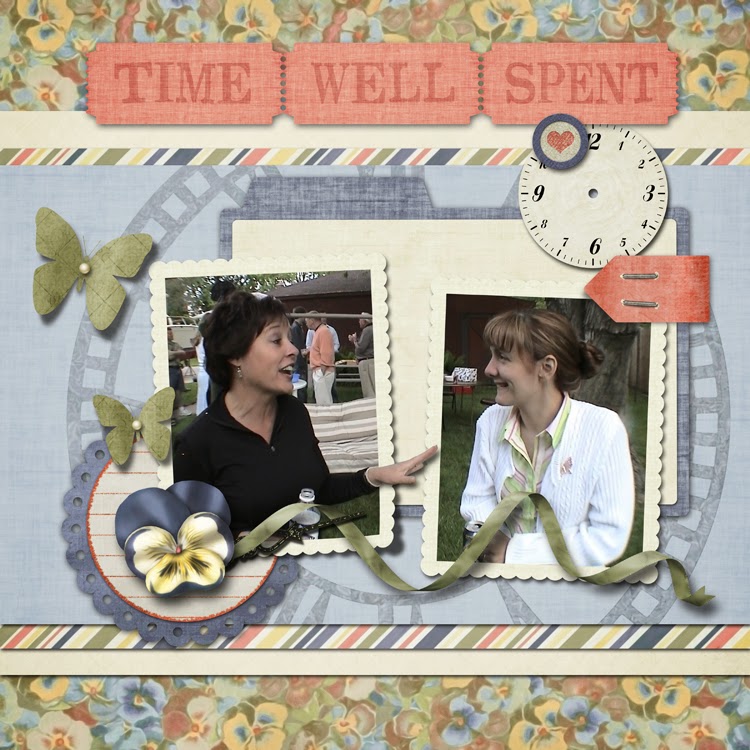
The kit and the add on pack in this case both included cute vertical photo frames.  The one of the left has a tiny eye catching detail at the bottom right where it lifts just a bit.  Anyway, it's fun to find a singe photo and arrange two frames over it to showcase only the important parts of the photo.  In this case, it's the two women talking. (Okay, so yeah, that's me on the right several years ago.)
Select and copy only the portion of the photo that would be in the frame on the left and then do the same for the right.  BUT... CRITICAL HERE.... COPY, do NOT cut.  We need to keep the original image handy.  I tend to always do that in case I want to change something.  Turn off the layer of the original image but do not move it.  We can't go back to it if it's not lined up where it should be.

So, the subject on the left has her poor hand cut off.  That's terrible.  That's also an opportunity for an OUT OF BOUNDS which just happens to be one of my very favorite things to add to a page.  (I wrote a TUTORIAL for out of bounds HERE.)
I went back to the original which was still there and in the same position and I selected her hand.  I copied it and moved it up in the layers so it sat on top.  It's really kind of strange looking without the drop shadow to make it pop.  (The TUTORIAL outlines adding the drop shadow.)
Ahhhh.... that's better.  Now, at this point, I always find that it's a good idea to collect all of the layers in this out of bounds portion of the layout into one group.  From the hidden original photo up through the subject photos, the frames, the drop shadow of the hand and the hand... all of it grouped together so there's less of a chance of a layer getting skewed.

Now I start to assemble my page.  It's digital so it's quick and easy to simply slap a bunch of stuff down.

Slip in some of the papers to create a main focus part of the page.  I like stacking papers so that it's not a single focus piece but it has accents... character... a little more color.
Which is pretty much how I ended up with this within about three minutes flat.  Oooo... little too much, me thinks.  Oh yeah... too much.  It's just too cluttered... the focus of the page is lost to all of the BEAUTIFULLY DESIGNED embellishments on this page.

That's when I start to mess around with things.  Good thing I grouped the main photo.  I would hate to mess that up with my messing around. 

This next part is the BEST part of digital.
First I clipped the large clock face stamp to be only on the light blue paper.  That's a little better. See how just that little bit of trimming cleans up the page?
The stamp still felt a little heavy so I lightened the opacity.  I also ditched the green fabric trim that I had originally tucked behind the photo group.  I didn't really ditch it, I turned off the layer.  I leave it in case I might want it in a different location or to try it again in the same spot.
 I centered up the title, lowered the opacity of the clock face stamp a little more...
I pulled in another embellishment...  Oh yes I did... on a page that I claimed was too busy. 
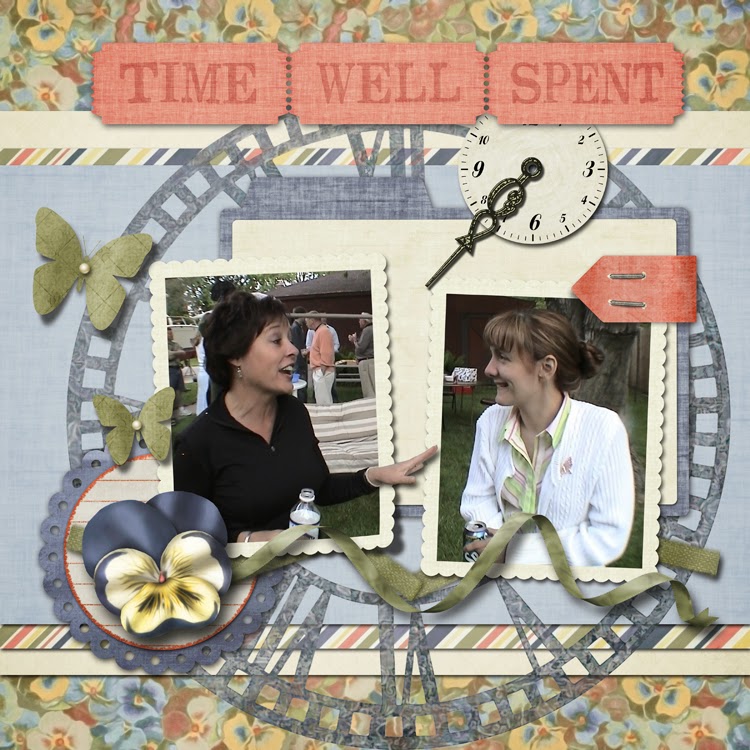
I brought in the tiny wood heart token for the clock hand.  I also moved the modern clock face and clock had around a bit until I liked where they were at.  Not much, just a little.

Then I stared at the page and asked myself, "Why are you not happy NOW?"

And I answered myself, because that's the polite thing to do, "The lovely flower... it's too big.  It catches my eye and holds it preventing me from moving about the rest of the page."

AND because I ALWAYS listen to myself, I made the flower smaller and tucked the circle journal paper under the photo group.


Page arrangements are best when they direct the eye easily around the page.  For the most part, this arrangement directs the eye in a clock-wise fashion starting with the title.

OOOO....  Yikes..... I just caught this.... that clock hand may have to go.  It really does stop the flow that I want which goes from the title, follows the right side of the clock face stamp, along the ribbon, and up the flight path of the butterflies.  As much as I wanted that clock hand to POINT to the conversation in the photo, it derails my flow.  Can't have that.

A little adjustment in location to the clock face and the wood heart token was needed after the clock had was removed.
I may have ditched one clock hand but I used another.  Do you see it?  It's almost hidden now but that's how it should be.  It's still there to point out the important part of the page but it certainly is not going to derail the flow.

I hope you enjoyed this little tutorial on page arrangement.

My digital scrapbook products at Digital Scrapbook Products can be found at Digital Scrapbook Place and My Memories.

Come chat with me EVERY WEDNESDAY at Digital Scrapbook Place.  There a great chat room there that's easy to use.  The chat is at 9 PM Easter Time.

You must be registered at DSP to log into the chat room... it cuts down on the rif-raf... 'cause we are wild enough on our own.  BUT registration is easy and it's FREE!!!  I wrote a tutorial for it.  It can take up to a few hours for your registration to go through the "this is not a spammer process".  This I know, because I'm part of the team the lock the doors when the spammers are knocking.  We like DSP to be free from icky spammers.

Click HERE for that registration tutorial.

I'll be chatting on Wednesday.  Come chat with us!!!


Oh... I almost forgot....
My FAMOUS Author Girlfriend, Lisa Wingate, has a new book coming out in February.


Wildwood Creek is the last book in her Moses Lake series of books.  With Lisa's books, there's really no need to concern yourself with the order she wrote them in.  You can read them out of order and not be confused.  I like that about them.

Wildwood Creek is a bit of life discovery, a hint of romance, drama, and a whole lot of suspense... but not too scary.  I promise, the suspense won't give you nightmares but the book will keep you up.  Once you get into the storyline, you WON'T want to put the book down.  This I know... One of the early readers and my BEST digital scrapbook customer was planning to be a no show at my chat last week so she could finish the book!  Are you KIDDING ME?  I think then she remembered who got her on that early reader list and she did attend the chat.  I suspect she simply logged in and scattered a couple of comments here and there.  She was likely still reading the book.  LOL... It's what I would have done.  Yes, the story is that gripping.  You can read the first 22 pages of it HERE.


Tuesday, August 30, 2011

Out of Bounds

One of the very first things that HOOKED me into DIGITAL SCRAPBOOKING was "out of bounds" scrapping. That's where a little part (or a big part) of the picture comes out of the frame. Maybe it's a secret desire to color outside of the lines that makes this style of scrapping appeal to me so much. I'm sure my kindergarten teacher would NOT approve!

Let's face it though...some pictures simply BEG to have something hanging out! Even the smallest out of bounds detail can add so much to a page. This page is a perfect example. The picture alone is cute but the fact that she appears as if she is starting to climb through the frame causes the page to be that much more engaging...if it's okay to use that term for scrapbook pages.


Here's how I did it. I'm using Photoshop CS5 but any photo editing software that allows for layers would work out fine for out of bounds work.
I start with the photo. Like I said, "Cute photo" but lets have some fun with it.


I pick out my frame that I'm going to want her to "start to climb through". I simply lay the frame over the picture and size the photo so that her hand and the top of her head will be covered.
Then I use my polygon lasso tool to create two new layers copied from the original photo. One is her hand and one is the top of her head. The the layer of her hand includes quite a bit of her forearm and the top of her head includes some of her forehead. This ensures that the frame will be covered. I move them up in my layers list so they are sitting on top of the frame. They do not have to be perfect because I will fine tune these layers in the next step.

Still using the polygon lasso tool, I clip away a lot of what I don't want until I get just a little bit of background left. Then using a small soft eraser tool, I clean up the edges of my two new layers. There are many ways to do this step, the soft eraser just happens to be my favorite. In my opinion, the soft edge actually looks better.


So now it's all cleaned up and the layers are ready to go. They are not quite popping out yet. We need a drop shadow for that.


Using settings similar to this, apply a drop shadow to each layer. You can see now just what I included in my layers. You can also see that I'm lazy and only clean up the edges that I know I'm going to need to. The extra drop shadow gets removed later so it really is no big deal that there's drop shadow hanging out where it doesn't need to be.


Now comes the hard part...just kidding...it really is not that hard. The drop shadow needs to be it's own layer so that it can be manipulated a bit and cleaned up. I do that by clicking my right mouse button on the word "effects" in the layer list for that layer and UP POPS this menu list. Click on Create Layer. You'll likely get some warning about how "some aspects of the Effects can not be reproduced with layers." We don't care, click okay.

Now comes some of that manipulating I was talking about. I love the warp tool for this but I imagine you can use a smudge tool if you don't have warp. The goal is simply to give the bottom of her hand a little more drop shadow than the top because that's how it would be if she were indeed trying to climb out of the photo. I did a wee bit on the top of her head but not much. Keep in mind where your lighting source is. The designers at Digital Scrapbook place use a drop shadow with a direction of 120 degrees. SO...using 120 degrees as my guide, I dragged the drop shadow under her finger tips outward in that direction.

Now comes the drop shadow clean up. I simply use the polygon lasso tool to clip the drop shadow off of the top of the photo. I used the edge of the picture frame as my guide.

And that's how it looks. It might take a couple of tries to get the drop shadow manipulated just right so that it looks real after you've clipped off the extra but it's worth it.

SO here's my photo now. To make it easier when I'm working on the rest of the layout, I group all of these layers together so that nothing gets out of alignment. You could merge them too if you prefer.

For this layout I used my Summer Linen Digital Scrapbook page kit which is available for purchase at Digital Scrapbook Place.

I guess this is my Mr. Ed layout. These are just a few of the horses that can be found at the polo stables in the residential development behind my house. I used my Summer Country Page Kit, Summer Country Add On Pack, and the Summer Country Paper Set.

This is one of my favorite pages. Just simply having his elbow sticking out makes it appear as if his hat is sticking out too. I used Dance of the Dragonfly Page Kit, Dance of the Dragonfly Add on Pack, and Dance of the Dragonfly Paper Set for this page.

She is just too cute. This is a PERFECT example of why out of bounds is so great!! This photo was a lot taller than it was wide. I was NOT going to get her full outfit into that square frame. What a shame that would have been for sure! So I performed a little bit of out of bounds magic on the hat as well as the one boot that she had just a step forward on the floor and made it look as if she were stepping right out of the frame. I used my Rodeo Ready Plopper for this page. Ploppers make pages like this way too easy! The Plopper was made from the Gone Country Page Kit, Gone Country Add on Pack, and the Gone Country Paper Set.

Here's another photo that was not going to fit into a square frame. So I let Grandma sit with her legs hanging out of the frame. She looks lovely, doesn't she? This page can be made up quickly with a Plopper as well. This one is called Imagene Doll. Imagene Doll is a delightful character from three of Lisa Wingate's books. I had so much fun reading about her that I simply HAD to make a line Digital Scrapbook products just for her. She has her own Imagene Doll Page Kit, Imagene Doll Add on Pack, and Imagene Doll Paper Set.

I can NEVER resist a well placed little foot hanging out. This page uses my Just Plain Sweet Page Kit and Just Plain Sweet Add on Pack.


Now, this page looks hard but it really is not. I used my Simply Sweet Plopper and used that same technique but with the entire image. I used the drop shadow effect and then created a layer out of the drop shadow. Then I just skewed the drop shadow so it looked as if she were walking into her shadow. Then I lowered the opacity of both the girl layer and the shadow layer so that the texture and color of the background came through. For the other images, I desaturated all of the colors except for the pink so that the page wasn't so busy with color.

I hope you've enjoyed this Out of Bounds tutorial. Let me know if you've tried it. I'd love to see your work!

Wednesday, February 23, 2011

Imagene Doll

I guess it's no secret to those who know me that my favorite author happens to be Lisa Wingate. She created a wonderful character, Imagene Doll. Imagene (pronounced I'm-a-jean) is one of the beauty shop babes from Lisa's three Daily Texas books. Talk of the Town happens to be FREE on Kindle right now. In the books, Imagene Doll works at the town diner but can be found next door at the beauty shop most of the time, sharing the town news (and maybe a little gossip) with her gal pals, Donetta and Lucy. She misses her dear husband something fierce and discovers that she has an abundance of time as well as love to share with the people she cares about. This Imagene Doll digital scrapbook page kit is brand new to the store at Digital Scrapbook Place. I love that vintage diner ticket in the kit.

I created an add on pack to go along with the kit.
This add on pack is a posting challenge FREEBIE. Just purchase the kit, create a scrapbook page with it and post in the gallery at Digital Scrapbook Place. Don't forget to put a link in the Imagene Posting Bonus forum so I can find it. Post your page by the end of the day, Saturday, March 5th to get the posting freebie.


The coordinating papers are a chat freebie for tonight, Wednesday February 23. Come to the DSP chat room at 9PM est for some fun chatting and these free papers.

Here are some digital scrapbook pages that I created using the entire collection.
From heritage...

to vintage...

to those precious little ones, this collection is very versatile. I really can't decide which page I like best.

Friday, February 11, 2011

Gone Country

I had the absolute honor of proof reading a manuscript for my girlfriend, Lisa Wingate, last week. It's her 17th book and will be the second book in the Moses Lake series. It was wonderful and took me on a delightful journey south to Texas. With this Michigan winter dragging on, the vacation of the mind was a welcome relief.

The first book in the Moses Lake series is called Larkspur Cove and is in bookstores now. I read that one about a month ago now just prior to it's release. You can read the first two chapters here.

With these two captivating stories fresh in my creative thoughts, I designed the Gone Country collection of digital scrapbook products.

Gone Country Page kit is available in the store at DSP

The add on pack for the kit is a posting FREEBIE. Find out more here.


The Gone Country Papers are available in the DSP store now.

This collection is so versatile. It was incredible easy to come up with several different pages.

Here is a heritage style page that I put together. This lovely couple is my great grandparents, George and Ellie.
This masculine style page features my treasured Grandpa in his boat on Bear Lake.

The way-too-cute star of this page is one of the little boys from across the road. This was taken several years ago. He's a little older now but rest assured, he's still way too cute.

And of course, here is the country that inspired the whole collection. These are some pictures that Lisa sent me of her boys out fishing. Aren't the colors PERFECT???

The sun is trying to shine through the light cloud cover outside. It snowed a little this morning. I never thought the sight of more snow could make me happy but the falling snow means just one thing right now --- it is not so bitter cold outside. It's been so bitter cold lately that it's actually been too cold to snow. Brrrrr.

I hope you'll enjoy a little trip to the (warm and sunny) country with these brand new digital scrapbook products.